


ThingsBook
4.2260.00 Reviews
App Specs
- Version
- 1.1.1
- Updated On
- License
- Free
- Downloads
- 100,000+
- Developer
- ThingsBook Studio
- Categories
- Social
- Platform
- Android
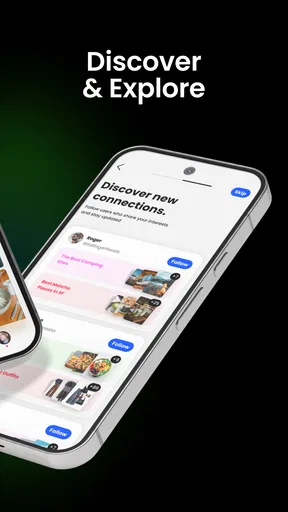
Screenshots
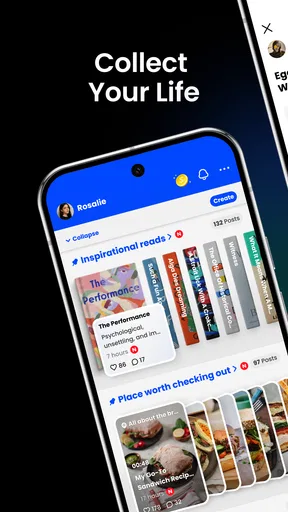
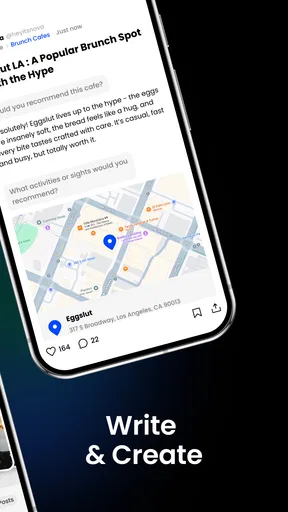
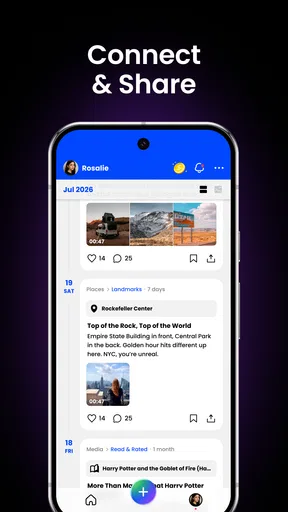
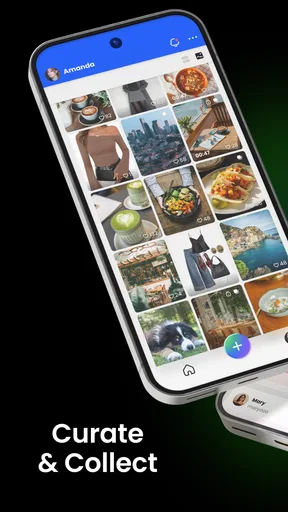
 Analysis by AppCompare
I judge a personal writing app less by how inviting it feels on day one than by whether I still have a reason to open it after the novelty wears off. That is the question I would ask of ThingsBook: can it become a comfortable place for keeping track of life, rather than another app that asks me to maintain it? Its central idea is appealing, but the long-term answer depends on how much structure you actually want in your routine.
Where the first-week appeal comes from
There is an immediate pleasure in having a dedicated space for scraps of thought, personal records, and things you want to return to. ThingsBook is a social-category app from ThingsBook Studio, but its personal notebook concept feels more reflective than the fast-moving feed most people associate with social apps. I can see the appeal for someone who wants to collect small pieces of everyday life without turning each one into a public post or a formal journal entry.
The first few days are also when a new system can make ordinary details feel worth saving. A line from a conversation, a note about a place to revisit, or a thought you do not want to lose can each become a small entry. That is a more realistic starting point than promising yourself a polished daily diary. Keep the first entries lightweight: if saving a thought takes more effort than the thought itself, you are less likely to return.
How it can earn a place month to month
A collection becomes useful when it helps you find meaning in what you have already recorded, not just when it stores more. I would use a personal space like this to capture details that otherwise disappear into camera rolls, message threads, and loose notes. For example, after a weekend trip, I might save the name of a café, a short memory about the walk there, and an idea for somewhere to go next time. Later, those details can be more useful together than scattered across unrelated apps.
That workflow is strongest when I have a clear reason to return: a recurring project, a changing personal goal, or a record I genuinely enjoy building. It is weaker if I expect an app to create a habit for me. A notebook can preserve what I choose to put into it, but the value still comes from making the occasional entry and revisiting it. I would start with one recurring theme rather than trying to document every part of life.
The app is free, and its average rating is 3.5 from around 140 ratings, with over 100 written reviews. I would treat that as a reason to try it with modest expectations, not as a verdict on whether it fits my particular routine. It has over 50,000 installs, and its Teen content rating makes it suitable for a teen audience under the store’s age guidance. It was released in January 2026, and version 1.0.7 is the version to look for. The minimum operating-system requirement is version 10.
The upkeep that a personal archive asks of you
Any app built around collecting personal material has a quiet maintenance cost: deciding what deserves a place, adding enough context to make an entry useful later, and occasionally finding what you saved. I would not try to write an essay every time. A short note with a clear subject is often more retrievable than an elaborate entry with no obvious point. When saving a thought, I would include the person, place, or project it relates to if that detail might otherwise be hard to remember.
Worth Reading Before You Choose

EA SPORTS FC Mobile 26 Is a Bigger Football Game, but It Takes Time

Flipboard Shows What News Apps Must Do Beyond the Feed

Switching to Android Auto Means Rethinking Your Driving Routine

Google Calendar Makes a Crowded Week Easier to Manage

Ludo King Makes the Most of the Minutes Between Plans

Baby Panda World Brings Quick Play to Modern Phones, but Its Game Library Feels Busy
A practical way to keep the habit manageable is to capture quickly in the moment and review selectively when there is a reason. For instance, a student could save a useful observation after class, then revisit only the entries relevant to an assignment. Someone planning a move could collect questions, neighborhood impressions, and small decisions as they arise, instead of trying to reconstruct them at the end of the week. These are useful only if the app’s actual organization suits the person’s needs, so I would test retrieval early rather than filling it with months of material first.
I would also decide in advance what belongs here and what should stay elsewhere. A private personal archive is not automatically the right home for urgent reminders, confidential work material, or information that needs a dependable backup process. For those, I would use a tool designed around the specific requirement. Keeping ThingsBook focused on reflections and useful personal context can prevent it from becoming a crowded substitute for every other app on a phone.
When the novelty starts to fade
The main risk is not that a notebook is a bad idea; it is that recording life can start to feel like a second job. If I felt pressure to save every outing or write something profound each day, I would quickly stop opening it. I would rather have a small collection that I am glad to revisit than a large, dutiful archive. Skipping a day should not feel like falling behind.
There is also a trade-off between one personal home and specialized tools. A conventional notes app is often better for quick, searchable reference material, while a calendar is better for time-specific commitments. Social platforms are built for sharing and conversation. ThingsBook’s appeal is the more personal act of collecting and returning to life notes; it is not automatically the best choice when the priority is scheduling, team coordination, or broadcasting updates.
Before relying on any personal archive, I would try a small test: add a handful of entries over several days, then see whether I can find one particular detail again without remembering exactly when I saved it. If retrieval feels awkward, the archive may become a drawer rather than a useful record. I would also avoid putting sensitive details in any app unless I have checked that its privacy and account arrangements meet my own needs.
Who is likely to stick with it
I can see ThingsBook working well for someone who likes keeping a personal record but finds a blank diary too demanding. It may also suit people who want a single place for small observations tied to an ongoing interest, such as cooking experiments, reading notes, or family memories. The key is enjoying the act of collecting, not expecting a tool to turn every saved item into a measurable accomplishment.
I would skip it if I mainly need a strict task manager, dependable alarms, shared project workflows, or a calendar-first view of the week. Those needs call for tools whose central purpose is to surface deadlines and coordinate action. Likewise, anyone who dislikes maintaining an archive may prefer ordinary notes that can be searched when necessary, without the expectation of building a personal collection.
For a realistic everyday routine, I might save a quick note after a conversation about a book someone recommended, then add a sentence after I start reading it. Weeks later, that small context could help me remember not only the title but why I chose it. The useful trick is to record the connection while it is fresh, rather than trusting myself to reconstruct it later. If I never return to such notes, though, a bookmark or a simple list would be less effort.
Getting Started with ThingsBook
First things first, downloading ThingsBook was a breeze. Available on both Android and iOS, it doesn’t matter if you’re team Apple or Android, you’re covered. Once you have it, the setup is smooth sailing. You just create an account or log in using your favorite social media. Easy peasy.
The interface is as friendly as your favorite barista. It’s clean, minimalistic, and intuitive. It feels like the developers really thought about how people use apps in real life. Everything you need is right where you expect it to be, which means less time fumbling and more time getting stuff done.
Main Features That Stand Out
Now, let’s dive into what makes ThingsBook a game-changer. The app is packed with features, but here are a few that really caught my eye:
- Task Management: You can create tasks, set deadlines, and even prioritize them. The color-coded system is a neat touch, making it easy to see what needs your attention first.
- Notes and Reminders: Whether you’re jotting down a quick note or setting a reminder for your next big meeting, ThingsBook has got you covered. The reminders are customizable, which is perfect for those of us who need a bit more than a nudge.
- Collaboration: This feature is a lifesaver for team projects. You can share tasks and notes with your team, making collaboration a breeze.
- Calendar Sync: Integrate with your calendar to ensure you never miss a beat. It's like having your personal assistant.
User Experience
Using ThingsBook is like having a personal assistant who never misses a detail. The app is designed to be user-friendly, and it shows. Everything is just a tap away, and the learning curve is practically non-existent. I found myself navigating the app like a pro within minutes.
Another thing I loved about ThingsBook is its performance. It runs smoothly, even when you have a ton of tasks and notes loaded up. No lag, no glitches, just pure efficiency. Plus, it doesn’t eat up your phone’s battery, which is always a bonus.
Why You’ll Love ThingsBook
If you’re anything like me, you value an app that not only looks good but also performs well. ThingsBook delivers on both fronts. It’s not just an organizer; it’s a productivity powerhouse. The app makes it almost fun to organize tasks and keeps you motivated with its slick design and seamless functionality.
In a world where time is money, having an app like ThingsBook is like having a secret weapon. It helps you stay on top of your game, and who doesn’t want that?
Final Thoughts
All in all, ThingsBook is more than just an app; it’s an essential tool for anyone looking to streamline their life. Whether you’re managing a team or just trying to keep your personal tasks in order, this app has something for everyone. And trust me, once you start using it, you’ll wonder how you ever got by without it.
So go on, give ThingsBook a whirl. It’s time to take your productivity to the next level.
Pros
- User-friendly interface for easy navigation.
- Seamless synchronization across devices.
- Wide variety of customization options.
- Rich library of templates and themes.
- Regular updates with new features.
Cons
- Limited offline functionality.
- Occasional syncing delays.
- Subscription required for premium features.
- Some features can be complex to learn.
- Notifications can be overwhelming.
FAQs for ThingsBook
What is ThingsBook and what can I use it for?
ThingsBook is a versatile productivity app designed to help users organize their tasks, projects, and daily activities efficiently. It offers features like task management, scheduling, reminders, and collaboration tools, making it ideal for both personal use and teamwork. Whether you're managing a personal project or coordinating with a team, ThingsBook provides a structured platform to enhance productivity.
Is ThingsBook available on both Android and iOS platforms?
Yes, ThingsBook is available for download on both Android and iOS devices. This cross-platform availability ensures that you can access your tasks and projects from any smartphone or tablet, keeping your productivity in sync across all your devices. The app is optimized for both operating systems, providing a seamless user experience.
Does ThingsBook offer integration with other apps and services?
ThingsBook supports integration with popular apps and services like Google Calendar, Dropbox, and Slack. These integrations allow users to streamline their workflow by syncing tasks and events across different platforms. This connectivity enhances the app's functionality, making it easier to manage all aspects of your projects in one place.
Are there any subscription fees or in-app purchases in ThingsBook?
ThingsBook offers both a free version and a premium subscription. The free version includes basic features, while the premium subscription unlocks advanced functionalities such as enhanced collaboration tools, additional storage, and customization options. Users can choose the plan that best fits their needs, ensuring flexibility and value.
How secure is my data on ThingsBook?
ThingsBook prioritizes user data security by implementing robust encryption methods to protect your information. Regular updates and security patches are also applied to ensure the app remains secure against potential threats. Users can trust that their data is safely stored and only accessible to authorized individuals, providing peace of mind.


